Makeup Tutorial & Beauty Tips
- 4.5
- Rating
- 500.00K
- Installs
- Free
- Price
 Analysis by App-foxy
I approached Makeup Tutorial & Beauty Tips as the kind of app I could open when I wanted practical help rather than a long beauty lesson. It is a free beauty app from Rstream Labs, aimed at people who want to learn makeup through guided tutorials instead of guessing their way through every step. After spending time with it, my impression is that it works best as a visual reference: something to consult before getting ready, while trying a new look, or when a familiar technique suddenly stops making sense.
The app has a 4.6 average from around 3.5 thousand ratings, and its reach is clear from more than 500 thousand installs. Those figures suggest that it has found a useful place among casual learners, although popularity alone does not make every tutorial equally suitable for every face, product collection, or skill level. My experience was more positive when I treated the app as a flexible learning aid rather than a personal makeup artist.
How the app feels in everyday use
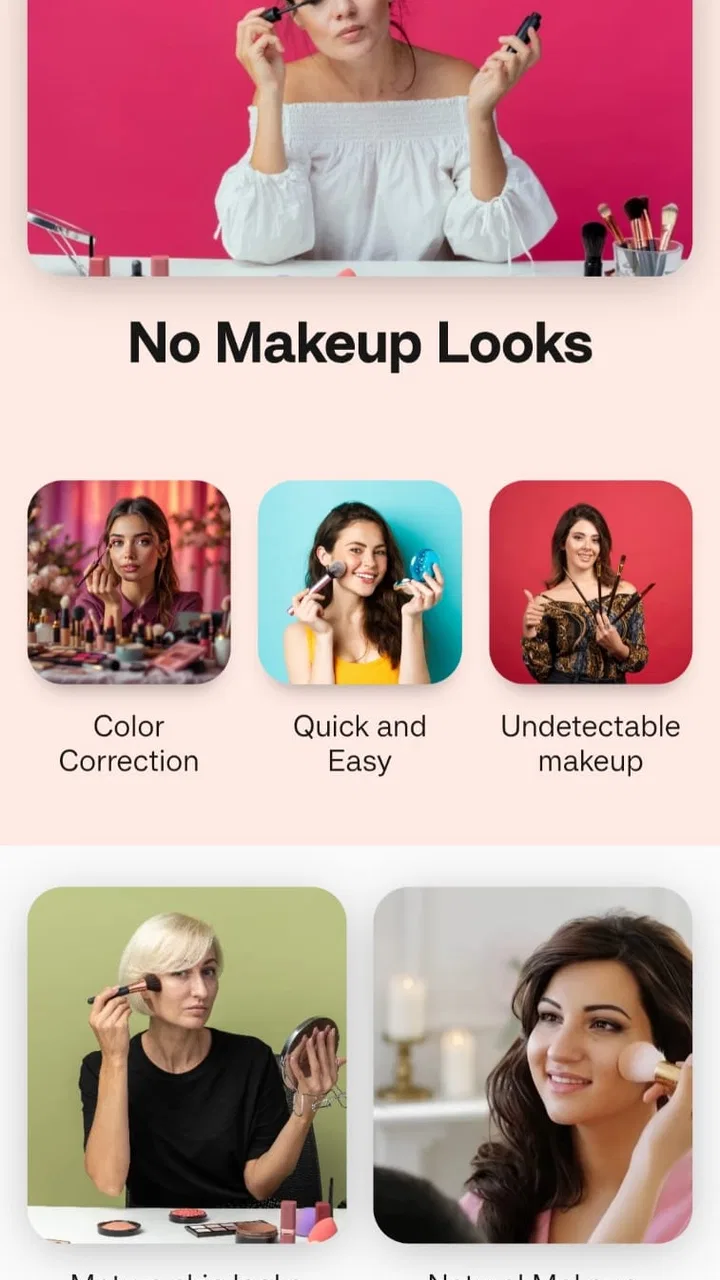
The central idea is simple: choose a makeup technique or look, then follow it in sequence. That structure is especially helpful for beginners because it turns a vague goal such as “make my eyes look more defined” into smaller actions. I found that less intimidating than opening a social video platform and sorting through a stream of unrelated advice, dramatic transformations, and product-heavy demonstrations.
You May Also Like

 Blood Strike: 2.5 Anniversary
Blood Strike’s Loadouts Turn Every Drop Into a Tactical Gamble
A close look at Blood Strike’s custom loadouts: how fast access to signature weapons reshapes its battle royale rhythm, rewards preparation, and narrows the gap between fights.

 Pandora - Music & Podcasts
Pandora’s Music Is Easy to Start, but Harder to Recover
Pandora’s strength is its low-effort path from a seed to a station. Its weak spot is how much confidence it asks you to place in connection, setup, and quiet recovery.

 8 Ball Pool
 Is Built on Rivalries, Rematches, and Routine
A close look at the rivalries, rematches, shared routines, and unanswered safety questions that turn a quick pool match into a persistent mobile community.

 Samsung Music
’s Quiet Strength Is Playing What You Already Own
Its reach comes less from spectacle than from dependable access to a personal library. That simplicity is both the app’s strongest retention engine and its ceiling.

 AccuWeather: Weather Radar
AccuWeather Review: A Quick, Clear Forecast for Everyday Decisions
For everyday plans, the best forecast is the one you can understand quickly. AccuWeather makes rain timing, radar, and local conditions easy to act on, with a few trade-offs.

 Hill Climb Racing
Why Hill Climb Racing Still Turns Crashes Into One More Run
A tiny car, a bumpy hill and one more upgrade: Hill Climb Racing keeps resurfacing because its simple chaos makes every near-miss feel personal.
More From Our News Desk



A realistic use case is getting ready for work or a casual event with only a few minutes to spare. I would first look for a manageable tutorial, check which products and brushes it appears to require, and then keep the instructions nearby while applying the makeup. The value is not that every result becomes identical to the example. The value is having an order to follow, which reduces the usual hesitation over what comes next.
That step-by-step approach also makes the app approachable for someone who owns basic products but lacks confidence. You do not need to begin with an elaborate collection or advanced skills. A user can use the lessons to understand the role of preparation, blending, placement, and finishing, then simplify the look around whatever is already in the makeup bag.
I would not describe the experience as a replacement for hands-on practice. Makeup depends on lighting, skin texture, eye shape, tools, and the texture of the products being used. A tutorial can show direction, but it cannot automatically adjust the technique to those differences. That is an important distinction for anyone expecting a guaranteed result after following each instruction once.
A useful starting point for beginners
For a complete beginner, the strongest feature is the reduction of decision fatigue. Beauty content can be overwhelming because there are so many competing methods for the same task. A guided sequence gives you a starting point and lets you notice which stage causes trouble. If eyeliner looks uneven, for example, you can focus on the preparation and application step instead of assuming the entire routine is wrong.
I also liked the possibility of learning in short sessions. Rather than trying to master a full face immediately, I would use one tutorial to practise a single area, such as blending eye shadow or improving the shape of a lip. This creates a more realistic learning routine. Ten minutes of repeated practice on one technique can be more useful than watching several unrelated looks in one sitting.
There is a practical trick here that is easy to overlook: pause after each major stage and compare the balance of both sides before moving on. Tutorials encourage forward movement, but makeup is easier to correct when differences are still small. Using the app this way turns it from passive viewing into a checklist for self-correction.
Where experienced users may still find value
More confident users may not need basic explanations, but the app can still be useful as an idea generator. I would use it when I wanted to break out of the same everyday routine or revisit a technique I had stopped using. The guided format is convenient for checking the order of operations, especially when changing from a minimal look to something more polished.
Its usefulness for experienced users depends on expectations. If you already know exactly how to adapt makeup for your features, you may find some lessons too introductory. In that case, the app is better for refreshing technique or finding a starting point than for delivering advanced, personalised coaching.
What the current version tells me about its direction
The current version is 3.0.592, which places the app beyond an initial experiment and suggests an established product rather than a one-off collection of lessons. It was released on October 7, 2022, and its continued presence alongside a substantial install base gives it a sense of maturity. I would still judge it by the quality and clarity of the current learning experience, not simply by the version number.
That evolution matters because tutorial apps can become frustrating when their organisation feels dated or when new material is added without improving the path for beginners. In this case, the app’s identity remains clear: it is focused on makeup education rather than trying to become a general social network, shopping destination, or complicated editing tool. That focus is one of its advantages.
The developer, Rstream Labs, has positioned the app around accessible instruction for different skill levels. In practical terms, that means the app makes more sense as a broad learning library than as a specialist course for professional artists. I appreciate that distinction because it helps set a fair expectation before downloading it.
Existing users moving to the current version should find the same basic purpose intact: open the app, choose a lesson, and use the guidance to build a look or practise a technique. The main benefit of an established version is familiarity. Once you know how you prefer to use the tutorials, the app can become part of a routine instead of something you explore only once.
There is also a useful workflow for building a personal practice plan. I would choose one tutorial for complexion, one for eyes, and one for lips, then repeat only the stages that felt uncertain. Keeping the routine narrow prevents a common mistake: changing several techniques at once and having no idea which adjustment improved or harmed the result.
What new and returning users should keep in mind
The app is free to install, which lowers the barrier to trying it. It carries a Teen content rating, so it is not presented as a children’s product, and that is worth remembering when deciding whether it suits a younger user. In-app purchases range from forty-nine cents to thirty-nine dollars and ninety-nine cents per item, so I would pay attention to any purchase prompt and decide in advance whether the free material is enough for my needs.
That pricing range does not automatically make the app poor value, but it does change how I would approach it. I would explore the available lessons first, identify whether the teaching style works for me, and only then consider optional spending. For someone who wants occasional inspiration, the free starting point may be sufficient. For someone planning to rely on a larger tutorial collection, checking the cost of individual additions becomes part of the decision.
On Android, the minimum operating-system requirement is Android 7.0. That makes the app accessible to users with older compatible devices, although the smoothness of any tutorial experience will still depend on the phone itself. A smaller screen can make visual details harder to follow, so I would use a stand or place the phone where I can glance at it without touching the display with makeup-covered hands.
That last point is more important than it sounds. A tutorial is only useful if the device remains readable and safe to handle during application. I found it better to review the complete sequence first, then position the phone away from loose powder, water, and brushes. This reduces interruptions and helps me concentrate on the technique rather than repeatedly reaching for the device.
Where the app falls short
The biggest limitation is the distance between a general tutorial and personal advice. The app can demonstrate a method, but it cannot see whether a shade is flattering under your lighting, whether a product is irritating your skin, or whether your eye shape calls for a different placement. Users who want tailored recommendations may prefer a consultation with a qualified professional or a platform built around interactive feedback.
Another limitation is that tutorials can encourage imitation without enough adaptation. A look shown on one face may depend on proportions, complexion, eyelid space, or product texture that another user does not share. I recommend treating every lesson as a framework. Keep the order if it helps, but adjust intensity, colour, and placement to suit your own features.
The app is also not the best choice for people who want ingredient analysis, shade matching, or detailed product comparisons. Its strength is instruction, not replacing a cosmetic reference guide. If your main question is whether a product suits sensitive skin, or which shade matches you in a particular brand, you will need another source and should not rely on a visual tutorial alone.
Users who prefer long-form explanations may find a lesson-based app less satisfying than a detailed video course. Short, direct guidance is convenient, but it may not explain every reason behind a technique. I personally prefer using the app for the practical sequence, then researching a specific problem separately when I need deeper information about skin preparation, hygiene, or product formulation.
It is also worth being realistic about results. Even an excellent tutorial cannot remove the learning curve involved in blending, controlling pressure, or working with unfamiliar formulas. If you are impatient with repetition, the app may feel less transformative than expected. If you are willing to practise and make small adjustments, it becomes considerably more useful.
How it compares with familiar alternatives
The usual alternative is a general video platform. Those services offer a wider range of creators and techniques, but they also require more filtering. You may spend as much time deciding which demonstration to trust as you do practising. Makeup Tutorial & Beauty Tips is more focused, so it suits someone who wants a direct route into instruction without navigating a large entertainment feed.
Beauty blogs and written guides have a different advantage: they are easier to scan when you need exact wording, product details, or explanations of why a step matters. I would choose a written guide when troubleshooting a persistent issue, such as creasing or patchiness, and use this app when I need to see movement, order, and placement.
In-person classes remain better for immediate correction. A teacher can notice pressure, posture, brush angle, or uneven application in a way an app cannot. However, classes require scheduling and may not be convenient for a quick routine before work. This app fills the lower-commitment space between experimenting alone and paying for personal instruction.
For that reason, I see it as most valuable when combined with other resources rather than treated as the only source of beauty knowledge. Use its tutorials to build muscle memory, written sources to understand products and skin concerns, and professional advice when a problem involves irritation or a more specialised need.
Who should download it, and who should skip it
I would recommend it to beginners who want structure, casual users who need a quick visual reminder, and anyone trying to make better use of a modest makeup collection. It is particularly suitable if you learn by watching and doing rather than reading long explanations. The free entry point also makes it reasonable to test before committing to a more expensive course.
I would be more cautious about recommending it to professional artists seeking advanced theory, users who need personalised shade or skin advice, and people who dislike optional purchase prompts. It is also not the right first choice for someone whose priority is cosmetic safety information. In those cases, a specialist source or direct professional guidance would be more appropriate.
My most effective way to use it would be to choose one realistic routine, watch through it once, and then practise without trying to copy every detail. I would note the two stages that need the most work, repeat those on another day, and only add complexity after the basic result feels consistent. This approach turns the app into a learning tool rather than a gallery of looks that are pleasant to view but difficult to reproduce.
Looking ahead, I would watch how the app continues to balance breadth with clarity. A larger tutorial collection is not automatically better if beginners struggle to find a sensible starting point. The most meaningful progress would be improvements that help users understand difficulty, adapt techniques, and move from one skill to the next without feeling lost. I would also pay attention to whether the experience remains comfortable for free users as optional purchases develop.
After reviewing it, I see Makeup Tutorial & Beauty Tips as a practical companion for learning and refreshing everyday makeup techniques. It does not replace a makeup artist, a dermatologist, or a detailed product guide, and it cannot promise that one routine will suit every face. What it does well is give uncertain users a clear sequence to follow and a low-pressure way to practise.
My final recommendation is positive, with sensible limits. If you want a focused beauty app that helps turn “I do not know where to start” into a series of manageable steps, it is worth trying. Start with the free experience, keep your expectations realistic, and adapt each tutorial to your own features and products. Used that way, it offers a genuinely useful bridge between watching makeup advice and confidently applying it yourself.
FAQs for Makeup Tutorial & Beauty Tips
01What features does the Makeup Tutorial & Beauty Tips app offer?
The Makeup Tutorial & Beauty Tips app provides a wide range of features including step-by-step tutorials, personalized makeup recommendations, and video guides tailored to various skin tones and types. It also offers beauty tips, product reviews, and a community forum for users to share their experiences and tips.
02Is the Makeup Tutorial & Beauty Tips app suitable for beginners?
Yes, the app is designed to cater to users of all skill levels, including beginners. It offers detailed tutorials that break down complex techniques into easy-to-follow steps, making it accessible for those new to makeup. Additionally, there are beginner-friendly sections that cover basic makeup application and essential tools.
03Does the app provide product recommendations based on skin type?
Absolutely. The Makeup Tutorial & Beauty Tips app includes a personalized recommendation feature that suggests products based on your skin type and tone. Users can input their preferences and concerns to receive tailored advice, which helps in selecting the most suitable makeup and skincare products.
04How often is new content added to the Makeup Tutorial & Beauty Tips app?
New content is added regularly to ensure users have access to the latest trends and techniques. This includes new video tutorials, articles, and updates on the hottest beauty products. The app also updates its database with seasonal makeup trends and expert advice to keep your looks fresh and current.
05Is there a community feature in the Makeup Tutorial & Beauty Tips app?
Yes, the app includes a vibrant community section where users can interact, share their makeup looks, and exchange tips. This feature allows for discussion and support among users, fostering a sense of camaraderie and enabling you to learn from others’ experiences and insights.
Pros
- User-friendly interface with easy navigation.
- Diverse range of makeup tutorials for all levels.
- Regular updates with new beauty tips.
- High-quality video content enhances learning.
- Customizable preferences for personalized tips.
Cons
- Requires internet connection for full functionality.
- Some features locked behind in-app purchases.
- Occasional ads disrupt user experience.
- Limited offline content available.
- Requires account creation for personalized features.

Makeup Tutorial & Beauty Tips
Gallery